Showing posts sorted by relevance for query apps. Sort by date Show all posts

5 Big New Ways Facebook Laid The Groundwork For Making Money During Q3 2012


You probably won’t see the revenue bump in Facebook’s earnings report today from all its new monetization schemes. But with this quarter’s rollout of Gifts, a mobile ad network, app install ads, FBX, and Sponsored Results, Facebook tried show the world that it has new engines to power profits. Earnings and share price may drag for a while longer, but here’s how they have the potential to kick into high gear eventually.
Facebook VP of corporate development Vaughn Smith said at a conference last week, “It’s funny to reflect back that in the first quarter of this year we had no ads on our mobile product.” Wall Street sure didn’t get the joke. Facebook’s user base is shifting to the small screen, and investors were right to worry the social network might not have a way to squeeze dollars from them there. That’s partly why its share price has stumbled to $19.32 down from $38 where $FB IPO’d.
So Facebook has been pushing itself through a transformation to become a company that thinks mobile first. From a product development standpoint, that shift has been rapid. A year ago it was designing for the web and then porting those designs to mobile. Now Facebook spec’s out products with mobile as the priority. Most teams ship their own mobile code too, instead of relying on a specific “mobile” team like it did last year.
But transforming into a mobile money-maker takes longer and Facebook still has to prove it’s possible. When it builds new commerce channels, it has to raise awareness and then get people actually opening their wallets. When it offers new ways to advertise, it must demonstrate to businesses that the ads deliver return on investment, and then recruit big spenders to buy them. It could take several quarters for the bump from new monetization schemes to appear in the bottom line if they even work.
Facebook’s existing mobile ad formats are performing well and all the ads tech companies saybusinesses are eager to buy them. But Facebook needs whole new ways to make money if it’s going to get to a more reasonable price-to-earnings ratio.
So let’s take a look at the five big revenue drivers Facebook announced or implemented this quarter, and how close they are to actually giving it a revenue boost:

FACEBOOK GIFTS
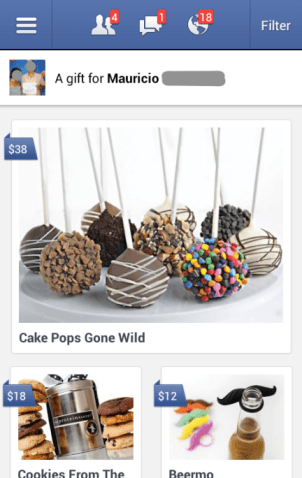
Launched September 27th, Facebook Gifts is the company’s big entrance into ecommerce that lets users buy presents for friends when it’s their birthday, wedding, engagement, graduation, other special occasion, or just whenever. Users see alerts about these special occasions and a chance to buy Gifts on the top right of the desktop homepage and at the top of the mobile news feed. The gifts range from digital gift cards to physical shipments of flowers, chocolate or toys that Facebook sources from and has delivered by its partners. Facebook earns an undisclosed, varying revenue cut on each gift sold.
Facebook Gifts has big potential because it knows who people are likely to buy gifts for better than anyone else. Whose statuses we like, who we have the most friends in common with, who our family members are, and who we’re tagged in photos with all factor into its affinity rankings. Many people visit daily and spend lots of time on Facebook, so there are plenty of opportunities to get them to purchase.’
Facebook also built the shopping experience around convenience, using profile data to suggest what people should buy friends. Young dude? It’ll say to buy him Bourbon-barrel aged maple syrup. Middle aged woman? A Starbucks card or box of chocolate might be the top recommendations. It could get people to buy gifts when they otherwise might just say “happy birthday”, and could pull dollars away from Amazon, gift card providers, flower delivery services, and brick-and-mortar stores.
Unfortunately, even if a reasonable percentage of US users bought a few Gifts a year, the margins may not be big enough to seriously move the needle. There’s also no international roll out in sight. In any case, that would definitely complicate shipping and many markets don’t have the disposable income to buy Gifts. Facebook may need to find a way to convince people in its key markets to buy as often as once every two months for Gifts.
Status: Gifts is still being slowly rolled out to U.S. users. By the end of next quarter it should have reached most of the U.S. and we may hear if people are actually buying Gifts.

MOBILE AD NETWORK

Announced September 18th, Facebook’s mobile ad network allows advertisers to pay it to improve the targeting of ads they buy within non-Facebook mobile apps and sites. It solves a major problem for both ad buyers and sellers — namely that ads are often inaccurately targeted. That means a buyer’s message doesn’t reach the right audience and they don’t get clicks. Meanwhile, ad hosts like apps and website can’t charge advertisers for clicks and the irrelevant content worsens the experience for their users.
While traditional ad networks make educated guesses about who their visitors are, Facebook knows a ton about its users because they volunteer their data. With Facebook’s bio, social, and app usage data, this new mobile ad network lets marketing messages be pinpointed to appear to 30-year-old engaged women, 26-year-old guys who Like surfing and live in Los Angeles, or 22-year-old recent Harvard alumni who use apps similar to one made by an advertiser.
The mobile ad network is huge for Facebook because it earns the company more money without forcing it put more ads or commerce options in its own apps. That lets it maintain the quality of its user experience, and avoid drowning out organic social content with paid ads. As the Internet is increasingly accessed through apps that need ways to monetize, Facebook could earn a lot of money by getting them to host its ads.
Status: Facebook’s still calling this a test, and only a few trusted partners can use it. Facebook hasn’t released details of the ad network’s partners, design, or performance, and it is unlikely to have produced noticeable revenue yet. But mobile ad spend nearly doubled this year, and Facebook could rollout expand the similar ad network for the web that it’s testing on Zynga.com. By next quarter there should studies available on its performance. It should also be accessible to more advertisers and visible on more apps. In 6 months we’ll see if it’s gained traction.

APP INSTALL ADS

Announced on August 7th, app install ads allow developers to pay to inject “Install Now” ads into the mobile news feed. They show their app’s name, icon, description, Facebook App Center rating, and friends who use them. When clicked they lead straight to the App Store or Google Play market where users can download the apps.
If the mobile web is all about apps, Facebook wants to be the way developers pay to get people to discover and install them. There’s already a huge industry around paid app discovery that Facebook is vying for a cut of. It could succeed by leveraging the amount of time users spend browsing its mobile apps and the knowledge of which apps their friends use.

Mobile app install ads are also Facebook’s first serious foray into showing non-social ads in the news feed, which includes some risk.. Friends don’t have to have Liked a developer or used an app for ads promoting it to show up in someones feed. As showing too many of these pure ads could drive users way, the revenue Facebook could earn on them is constrained.
Status: Last week all developers gained the ability to buy app install ads. Expect studies on their performance to arrive soon and Facebook to highlight the money they’re generating in its Q4 earnings.

FACEBOOK EXCHANGE

Though it was revealed late in the previous quarter on June 13th, we didn’t hear the first results from the Facebook Exchange (FBX) cookie-based retargeted ads program until late August. FBX lets advertisers target their ads on Facebook to users who’ve recently visited specific websites. For example a travel company could target users who viewed but didn’t buy a flight to Hawaii with ads promoting that same flight.
The early rumors said they were working very well, and by September Facebook permitted the demand-side platforms that buy the ads to share performance results, which were extremely promising. For some advertisers, each dollar they spent on FBX ads brought in $16 in sales. And I’ve heard that while DSPs are still learning how to use FBX, they are getting as good of results from it as they get from Google’s retargeted ads that they’ve been buying and optimizing for years.
FBX lets Facebook break into the realm of advertising to people with purchase intent, similar to search ads. Because the return on investment can be linked more directly to ad spend, advertisers may be willing to pay more for FBX ads than the traditional brand advertising seen on Facebook. Many advertisers have specific budgets for retargeted ads that Facebook can now tap into. If it can provide conclusive evidence that FBX works better than Google’s ad exchange, massive spend could pour in.
Status: Over a dozen DSP partners can now buy FBX ads, initial results are strong, and more advertisers are getting excited about the program. They’ll still need time to learn how to master the ad format, but we may see notable revenue from the product on the earnings call. By next quarter spend should ramp up and FBX could become a significant part of Facebook’s business.

SPONSORED RESULTS

Facebook doesn’t have a full-fledged web search engine yet, but on August 22nd it officially launched its Sponsored Results ads for the site’s search typeahead. These let businesses pay to have their Page, app, or other Facebook property appear above organic results when users search for a specific property. For example, gaming company Playdom currently pays to show its game Marvel: Avengers Alliance at the top of typeahead results when people search for “Mafia Wars”, a game by its competitor Zynga.
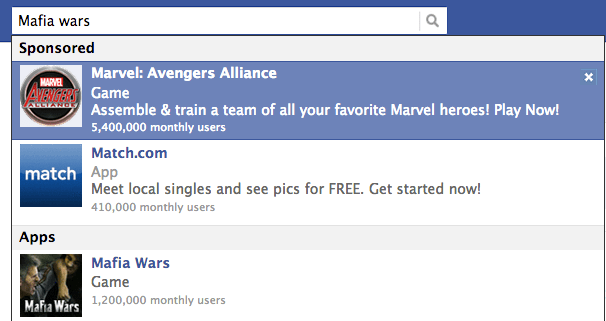
Initially announced in the previous quarter, these last few months saw the rollout of the API for buying Sponsored Results, and the first reports of the performance. Optimal attained click through rates between 0.7% and 4.1%, well over 10x better than standard Facebook sidebar ads. Meanwhile Nanigans saw CTR exceed 3% in some campaigns, and found the ads could cost less than standard ads.
Sponsored Results are a powerful way for businesses to divert traffic to themselves and away from competitors, making them a lucrative buy in cut-throat industries. Their performance and advertiser interest bodes well for the money-making potential of a real Facebook web search engine — something CEO Mark Zuckerberg said is in the works and investors are salivating over. But for now, there may not be enough people searching in the typeahead for these to be hugely profitable.
Status: Sponsored Results can now be purchased through the Ads API and Power Editor, and are now appearing in the typeahead results of search for many popular apps and Pages. They may have already generated a little revenue, which could grow next quarter. More important, though, is how they foreshadowing a serious Facebook search ads business — a completely new monetization channel.

IT’S GONNA GET WORSE BEFORE IT GETS BETTER

Until these products gain traction, Facebook’s earnings may not be too impressive. And next month, nearly 1.2 billion additional shares will become eligible for sale by employees and investors when a big part of the company’s stock lock-up expires on November 16th. That means the share price is likely to dip lower.
$FB may rise again once this major post-lockup flood subsides and these new money-makers kick in, but at least until then Facebook will need to sell Wall Street on the future, not the present. It has to communicate that the evolution of advertising and commerce depend on the data only Facebook has.

Enhanced by Zemanta
Tags: Facebook, Starbucks, Wall Street, FBX, Facebook Gifts, Facebook features, Mobile code, Mobile payment

9 Great Mobile & Web Apps For Small Business Owners


Web, smartphone and tablet apps are the future of small business tools. Tasks that used to require dedicated, expensive equipment can be accomplished in the browser and on mobile devices. These apps keep your business information at your fingertips, and easy to communicate to other key personnel. The biggest problem with apps (whether on the web or in the popular mobile app stores) is that the market is saturated – making it hard to surface the diamonds among the coal without help. To that end, here are nine apps for your phone and browser that should help your small business thrive.
  1. Prosper Remember microlending in the 2000s? Where regular folks could lend $50 or $100 to a third-world merchant so they could build their business? Prosper combines that concept with Kickstarter-style crowdfunding. You create a profile and ask for a loan. Investors sign up to lend you the cash. All on your phone.
  2. FreshBooks A bookkeeping app for the rest of us, Freshbooks lets you track spending, billing and income and store the data in the Cloud. Where Quickbooks is robust to the point of being unnecessarily complicated for most small businesses, Freshbooks is streamlined and easy to use.
  3. Campfire You’ve probably heard of Campfire, but it’s surprising how many people don’t yet use it. This is the app for communication and collaboration between team members working from remote locations. From chats to full project collaboration, the Campfire suite remains on the top of the pile.
  4. Evernote This app’s logo is a stylized elephant. It’s not the Republican party’s newest gizmo, but a program designed to help you “remember everything.” Store voice notes, text, photo and video according to your organization scheme for later retrieval. This may be the ultimate data collection device for use with the celebrated Getting Things Done method.
  5. Bump Virtual business cards. Not just virtual business cards you can insert into emails and similar communication, but a program that literally trades contact information when you bump to smartphones together. Apt to replace the traditional “fist bump” of greeting within the next ten years.
  6. Square Less than ten years ago, processing credit cards meant leasing an expensive machine — and the machine had to stay plugged into your phone jack unless you wanted an even more expensive portable unit. Square is the solution, offering competitive rates for using your tablet or smart phone to process credit cards. Requires a “swiper” unit you plug in to the headphone jack.
  7. Remember the Milk A virtual to-do list, this web service lets you enter all of your tasks and provides you with agendas and reminder messages according to your preferences. The app gives you real-time access from your portable device.
  8. TripIt A simple app with free and upgrade versions that helps you organize the details of your business trips. Not necessary if you only take that one simple trip each year, but a true lifesaver for those who travel frequently on complex junkets.
  9. QuickOffice One of the onlymobile  apps that lets you alter as well as view your Office or Google documents from a smart phone. Excellent for making those last-second changes in the elevator or waiting for your flight.

8 Tablets for Business: the Pros and Cons


Tablet computers are in high demand -- from Apple's popular iPad and much-rumored iPad mini, to Google's smaller but powerful Nexus 7 and Microsoft's forthcoming Surface.
But as the popularity of the Kindle Fire proves, tablets are not one-size-fits-all. For business users, your choice can depend on how you plan to use a tablet -- making presentations, processing transactions or reading documents. You should also take into account your preferred mobile operating system, available apps and the kind of connectivity you'll need.
Here's our guide to eight of the best existing and soon-to-arrive tablets:
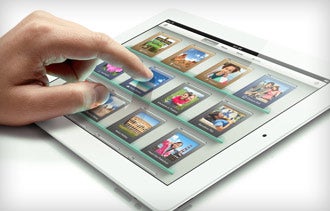
Apple iPad: 3rd generation
In March, Apple launched the third-generation iPad, notable mainly for itshigh-resolution Retina display, more powerful five-megapixel camera and optional 4G wireless network connectivity.
Pros: Several iOS business apps have versions designed specifically for the iPad, including task-management toolOmniFocus and Microsoft Office.
Cons: But many iOS apps for services popular with small-business users, such as Freshbooks and GoToMeeting, are still designed only with the iPhone in mind. This means using such apps on an iPad is like having a giant iPhone, and many iPad users find them unwieldy.
Price: From $499 (16 GB, Wi-Fi only) to $830 (64GB and 4G with AT&T or Verizon service). As with any tablet, you either have to pay for a new tablet data plan or add the device to an existing plan. Price vary depending on the carrier.

Related: With a Dazzling Display, the New iPad Will Be Attractive for Many Business Owners
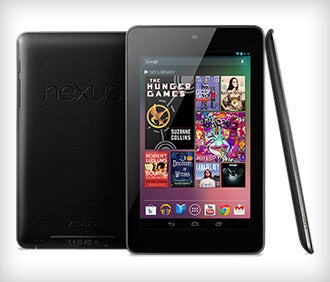
Nexus 7
Nexus 7
Manufactured for Google (Android) by Asus, the Nexus 7 tablet, was introduced in the U.S. this summer. It has a display measuring only 7 inches diagonally, compared to the 9.7-inch iPad display.
Pros: Smaller tablets fit more comfortably into pockets or purses and tend to be more convenient to hold with one hand. So far, the Nexus 7 is the only tablet sporting the latest version of the Android operating system, called "Jellybean." It will be among the first to receive Android system updates pushed directly from Google and not from wireless carriers or device manufacturers.
Cons: So far, the Nexus 7 is Wi-Fi only, and the maximum available storage is 16 GB. There isn't a sizable selection of Android apps optimized for this device yet. But because it's a relatively small tablet, using apps designed for Android smartphones may be acceptable.
Price: $199 (8GB) or $249 (16GB).

Related: Google's Nexus 7: The Latest Entry in the Tablet Wars
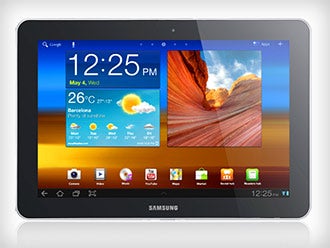
Samsung Galaxy Tab models
One of the first Android tablets to hit the market, the Galaxy Tab was released in the U.S. in late 2010. Currently, there are three main products in the Galaxy Tab family.
Pros: On the large side, Samsung's full-size Galaxy Note tablet features a 10.1-inch display and comes with an "S-Pen" stylus option, which can be useful if you sometimes prefer writing or drawing on your tablet in a paper-like fashion.
If you prefer a smaller tablet or 4G wireless connectivity, Samsung offers the seven-inch Galaxy Tab 7.0 and it's counterpart, the 7.0 Plus. In between, size-wise, is the Galaxy Tab 7.7.
Cons: Galaxy Tab products come with the "Ice Cream Sandwich" version of Android, as modified by Samsung. This means that updates to Jellybean and future Android "flavors" will lag behind Nexus tablets, perhaps by many months
Also, all 10.1-inch Samsung Galaxy tablet models are Wi-Fi only.

Prices: The Galaxy Note tablet ranges from $499 (16GB) to $549 (32GB). The 10.1-inch version of Samsung's Galaxy Tab 2 starts at $399 (16GB). The Galaxy Tab 7.0 and 7.0 Plus cost about $250 (16GB, 4G) from carriers. The Wi-Fi only models cost up to $100 more. The Galaxy Tab 7.7 is available only from Verizon, so it includes 4G access, and starts at $279 (16GB).

Related: What the Apple vs. Samsung Lawsuit Means for the Future of Smartphone Design
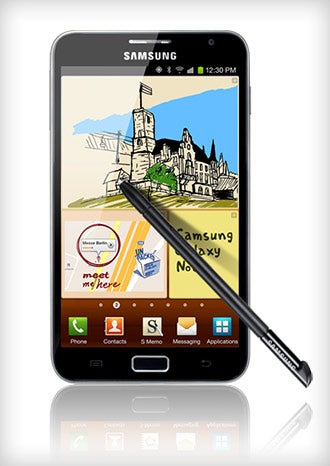
Samsung Galaxy Note hybrid phone/tablet
If you'd rather not carry two mobile devices, this hybrid phone/tablet may be right for your business. Samsung launched the Galaxy Note a year ago.
Pros: It's like two mobile devices consolidated into one. Also, it features Samsung's S-Pen stylus, which reviewers have praised for its precision and responsiveness. And it includes an eight-megapixel front-facing camera.
Cons: At 5.3 inches, the display is large for a phone, but small for a tablet. Some users find this awkward. The Galaxy Note may come with Android Ice Cream Sandwich installed but, depending on carrier or retailer inventory, some devices may be shipped running Gingerbread -- a much older version of Android.
Price: Available in the U.S. via AT&T starting at $199 (with a two-year service contract) or $599 (no contract), or from T-Mobile starting at $249 with a two-year contract or $699 (no contract).

Related: 5 Procrastination-Busting Smartphone Strategies
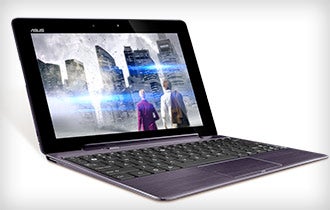
Asus Transformer Pad Infinity
The Asus Transformer Pad Infinityfeatures a high-resolution 10.1-inch display and up to 64 GB of memory, and it comes with Android Ice Cream Sandwich.
Pros: Reviewers generally praise this tablet's built-in keyboard dock. It effectively turns this tablet into an Android-powered laptop (with a full keyboard, track pad and USB port) and contains its own battery, providing up to seven additional hours of use.
Cons: This tablet is Wi-Fi and Bluetooth only.
Price: About $480 (32GB) and $580 (64 GB).

Related: 5 Things to Consider Before Buying a Smartphone or Tablet for Business
 
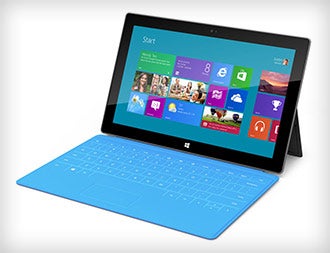
Microsoft Surface tablets
Reportedly going on sale Oct. 26, theSurface represents Microsoft's first serious foray into the tablet market.
Pros: According to Microsoft, these tablets will feature the new Windows 8 operating system designed to run on both computers and mobile devices.
The base Surface model will run a slightly modified version of this operating system (Windows RT) and will be available in 32 and 64 GB versions. The Surface Pro will run straight Windows 8 and come in 64 and 128 GB versions.
They also will feature a 10.6-inch HD display and a molded magnesium casing, which could make them look and feel sleeker than most Android tablets.
Cons: Windows 8 features a new tile-based user interface called "Metro." Users who are accustomed to previous versions of Windows may find it perplexing. Windows apps will need to be radically redesigned to accommodate this operating system, and will probably require further optimization for the Surface.

Price: Microsoft CEO Steve Ballmer has hinted that prices could range from $300 to $800.

Related: For Windows Users, Microsoft's 'Surface' Might Be Your Next Tablet
 
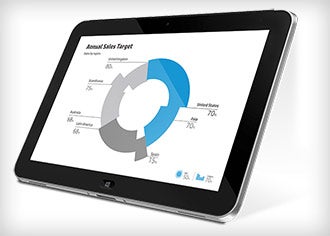
HP ElitePad
HP ElitePad
Microsoft won't be the only company selling Windows 8 tablets. In January, HP expects to launch its ElitePad, a 10.1-inch tablet intended primarily for business users.
Pros: It will come running the Windows 8 operating system, but reportedly it also will be able to run Windows 7 or XP. Up to 64 GB of storage will be available.
This device is meant to be durable, with a more rugged casing than most tablets have. It also comes with security software installed. Accessories will include a jacket with extra battery, stylus and docking station.
Cons: It will face the same issues with the new Windows 8 user interface as the Microsoft tablet. Its security measures and some other features may be overkill for most small-business users.
Price: Not announced yet, but expect the ElitePad to be costlier than most comparable tablets.

Related: 4 Tools for Turning an iPad into a Retail Workhorse
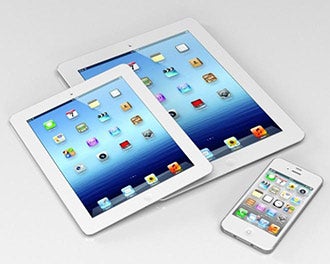
Apple iPad mini
Apple iPad mini
Apple is expected to announce a smaller and less expensive iPad model as early as Oct. 23.
Pros: In September, leaked images of a purported iPad mini showed a 7.85-inch display, compared to the 9.7-inch display on the standard iPad. At this size, iPhone apps that are unwieldy to use on a full-size iPad may seem better.
The iPad mini would probably offer 3G or 4G network access, in addition to Wi-Fi.
Cons: Apple will need to keep the price range for this product competitively low, and that will entail tradeoffs. Unlike the standard iPad, an iPad mini would be unlikely to have a Retina display. And the base model may come with only 8GB of memory.
Price: If rumors prove true, the iPad mini will most likely be priced to be competitive with Amazon's Kindle Fire HD, which starts at $199.
Tags: Apple, iPad, iPhone, Microsoft, Google, Kindle Fire, OmniFocus, IOS

Enhanced by Zemanta

8 Apps You Don’t Want To Miss


It can be tough to keep up with all the new apps released every week. But you’re in luck — we take care of that for you, creating a roundup each weekend of our favorite new and updated apps.
This week we found an app that will help you find a lost phone even if your battery is dead, and another that will make sure you don’t forget the name of that book your friend recommended.
A popular Sega game made its way to iPhone, and a popular glam rock band released an augmented reality app you’ll have to see to believe.
Check out the gallery above for a look at this week’s app highlights.
Still looking for more? See last week’s Apps You Don’t Want To Miss for more highlights. Think we left a great new app off the list? Let us know about your own app highlights from this week in the comments below.
Photo courtesy iStockphoto, scanrail.

12 Cloud Apps To Make Your Business More Productive


Sick and tired of hearing me bleat on about my favourite apps and services? Sit back and read this guest post originally published back in 2010 by James Adams who outlines his personal choices.
Cloud computing is the latest in the trend to minimize IT costs and increase productivity. Software from the cloud takes the burden of administration off of the local organization, relieving much of the demand for in-house expertise. Cloud based represents higher productivity for in-house and mobile workforces in the form of accessible and secure computing with more up time. Here are 12 cloud apps that will make your business more productive.
1-basecampAn online project management tool that runs through the cloud and provides team collaboration features. Everything you need to manage your projects is found in Basecamp, including file sharing, scheduling, task management and assignment, and feedback. Basecamp interacts with several iPhone apps, and third party computer-based tools to give you maximum accessibility and flexibility wherever you are. Packages available range from 15 projects to unlimited. A 30 day trial lets you see if Basecamp will fit the needs of your business before you buy.
2-dropboxA web-based file sharing service that also provides secure file storage, synchronization, and backup. Files can be accessed from anywhere and changes made to files by the team are automatically synced to user’s local computers. Supports Linux, Mac, and Windows. Dropbox offers 2 GB of storage free so you can see how it works prior to purchasing.
3-zohoA cloud based office software suite, offering powerful document creation management tools for spreadsheets, word processing, invoicing, CRM, and more. You pay for only the apps you use.


4-dimdimWeb conferencing software that resides in the cloud and offers a great medium in which you can interface with your mobile workers, customers, and vendors. Rather than having people travel to meetings, why not let everyone stay home, save the earth and attend the meeting online?

5-pixlrCloud-based image editing services. Three applications, Editor, Express, and Grabber combine to give users amazing power to create and edit images.


6-githubSocial coding application that runs through the cloud to provide version control and collaborative software development. Several packages are available from the free open source plan to the Giga plan that includes 300 private repositories, private collaborators, and 60 GB of storage. There is also an enterprise version of Github that companies can deploy on their own cloud platform.

7-freshbooksA financial management application that’s hosted in the cloud. This program offers “painless billing” that makes it easy to bill clients, track payments, and perform other bookkeeping. This app is specially designed for teams, freelance workers, and service providers.

8-google-docs
A personal repository of documents that can be shared and updated as needed. Google Docs features revision tracking and allows users to save documents locally if necessary. This application is free.

9-mojo-helpdeskProvides online customer relationship management (CRM), including request tracking, ticket assignment, email integration, and on demand help. Eleven users are supported for the $24 monthly fee, with an unlimited option available for $49.

10-cloudmark-desktopBusiness with real time protection from email spam, phishing, and viruses without loading down the computers on your network.


11-appointyAn online scheduling software that provides businesses with appointment and schedule management. The software can be configured to allow customers to make their own appointments and send out text and voice alerts for appointments. Appointy even has tools available to promote your business. Practically any business that schedules appointments over the telephone will appreciate the power Appointy offers to make businesses more efficient and productive.

12-gliffyProvides cloud-based charting and diagramming. This powerful app gives business access to the tools needed to create professional flow charts, floor plans, and technical drawings.
Cloud based applications are perfect for managing business functions from any web browser so employees and managers can be productive wherever they are. With software management and administration performed by the host, businesses can focus on their mission rather than on IT related tasks. Try these applications out and see how powerful web-based applications can transform your business.
This guest post was written by James Adams who is a blogger working for an online storeoffering toner next day for the UK. He is a contributor to their design blog where he posts about technology and design.
Tags: Basecamp, Cloud computing, Project management, Linux, Web conferencing, Office suite, iPhone, Windows

Enhanced by Zemanta